Policies
Policy groups and the full inspection ladder — 13 tabs
Configuration
Who a policy group applies to, and the coarse on/off switches that sit above every other rule. A group with no selectors is a catch-all; the shipped Default group is exactly that.
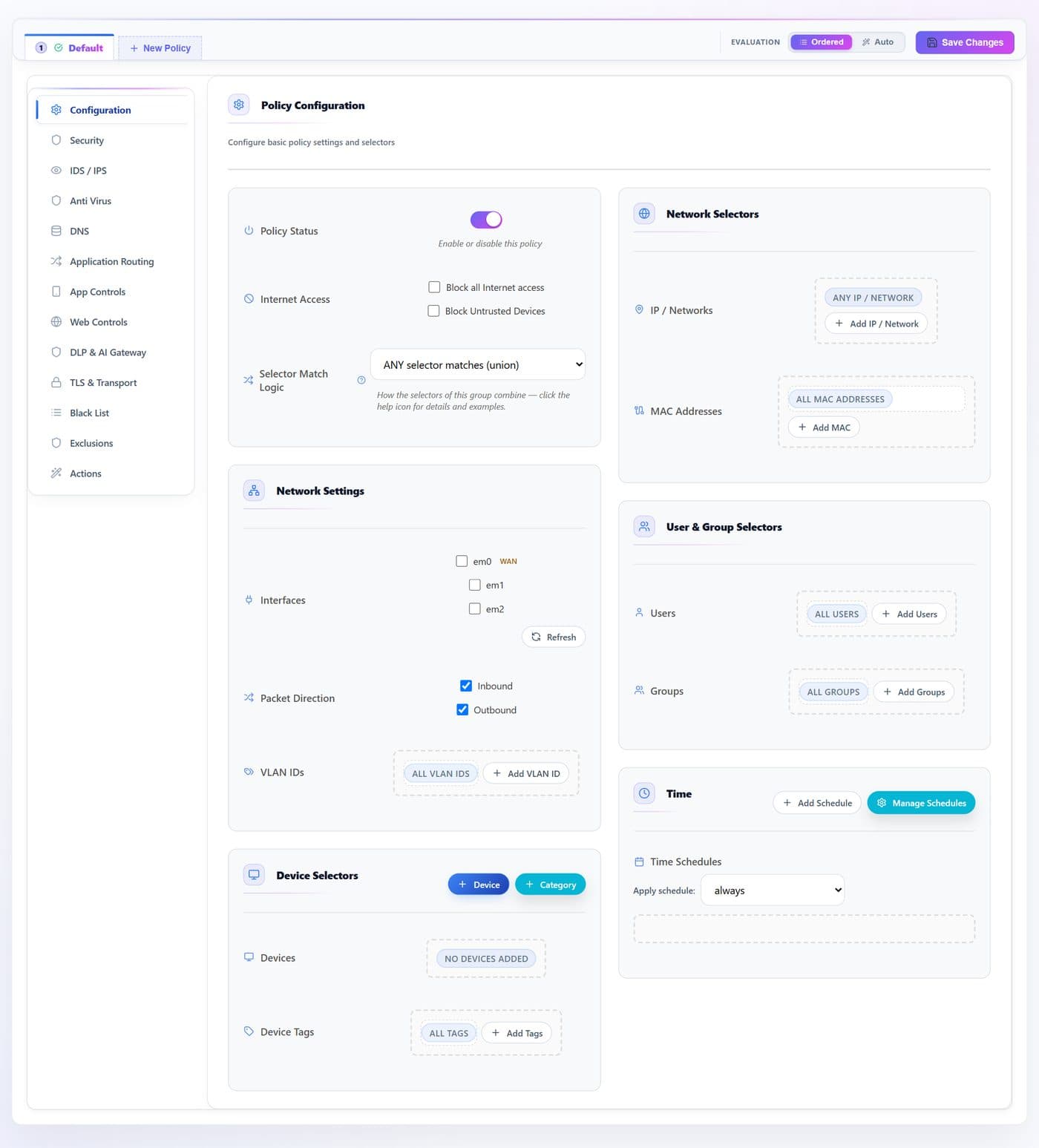
- 1
- 2
- 3
- 4
- 5
- 6
- 7
- 8
- 9
- 10
- 11
- 12
- 13
- 14
- 15
- 16
- 17
| # | Control | What it does · how · why |
|---|---|---|
| 1 | Policy Statustoggle | Enables or disables the whole group. Off means the group is skipped entirely — traffic falls through to the next group in order, ending at Default. groups[].status |
| 2 | Block all Internet accesstoggle | A hard override evaluated before any rule: drops every flow the group covers, except the appliance’s own services. Pair it with a schedule to build a time-boxed lock-out. overrides.block_all |
| 3 | Block Untrusted Devicestoggle | Drops only devices the inventory has not marked trusted, so a new or unknown host gets nothing until you classify it. overrides.block_untrusted |
| 4 | Selector Match Logicselect | ANY (union) or ALL (intersection) across the dimensions below. See the note above. selectors.logic |
| 5 | IP / Networksbutton | Source and destination subnets the group targets. A bare address gets /32 (or /128 for IPv6); “Both” matches only when source AND destination are in the list. Empty means any. selectors.src_cidrs · dst_cidrs |
| 6 | MAC Addressesbutton | Target specific hardware by MAC. Any separator style is accepted; stored upper-case. selectors.devices (MAC form) |
| 7 | Interfacestoggle | Restrict the group to traffic on chosen engine interfaces (em0 is WAN here). A saved name that is not currently attached shows in red and is kept, not dropped. selectors.interfaces |
| 8 | Packet Directiontoggle | Inbound, Outbound, or both. Unchecking both means “any” — the two boxes are really a three-state control. selectors.direction |
| 9 | VLAN IDsbutton | Scope by 802.1Q VLAN. Accepts single ids and ranges (10, 20, 100-105); anything outside 1–4094 is dropped. selectors.vlans |
| 10 | Devicesbutton | Target named devices from the inventory. selectors.devices |
| 11 | Device categoriesbutton | Target whole device categories instead of individual hosts. selectors.device_categories |
| 12 | Device Tagsbutton | Free-text tags that group devices logically — guest, iot, vip. selectors.device_tags |
| 13 | Usersbutton | Target directory users; the list comes from the identity inventory. selectors.users |
| 14 | Groupsbutton | Target directory groups. Membership ranks below an exact user match in Auto mode. selectors.groups |
| 15 | Apply scheduleselect | Bind the group to a named schedule. Outside its window the engine skips the group (it does not drop) and moves to the next — so a strict group plus a schedule gives access only during set hours. overrides.schedule → globals.schedules[] |
| 16 | Add Schedulebutton | Define a new time window — one unified range or per-day ranges — and apply it to this group. globals.schedules[] |
| 17 | Manage Schedulesbutton | Edit or delete existing windows. Deleting one resets this group’s reference; other groups that referenced it are healed to always on the next save. globals.schedules[] |
Security
Two curated threat-intelligence bundles — Essential (7 categories) and Advanced (26) — plus a per-group custom indicator switch. Each category is a live feed the engine matches against domain, SNI and destination IP.
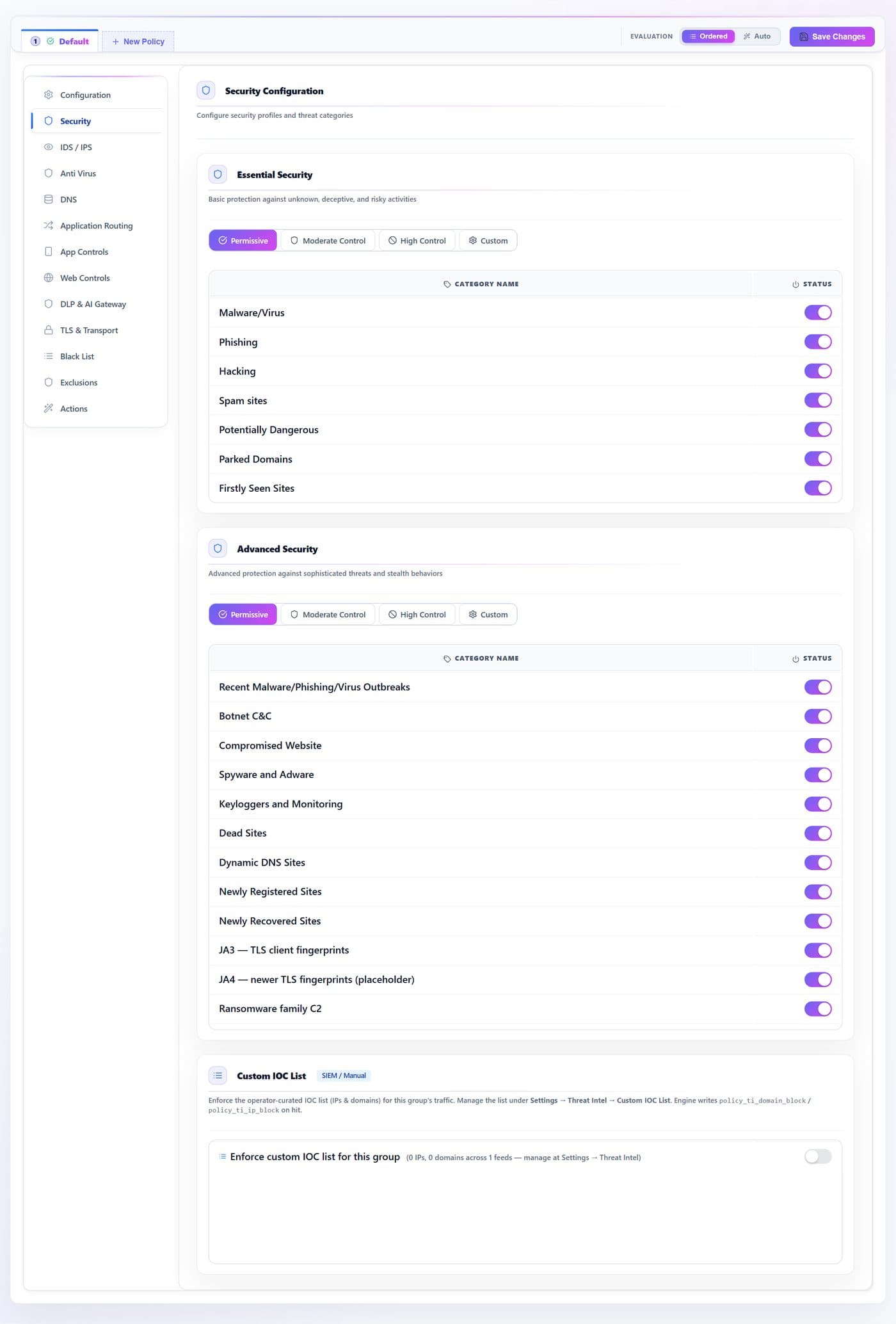
- 1
- 2
- 3
- 4
- 5
- 6
| # | Control | What it does · how · why |
|---|---|---|
| 1 | Essential profileradio | One-click preset for the Essential block: Permissive (all off), Moderate, High (all on), or Custom. security.basic_mode (UI only) |
| 2 | Essential categorytoggle | One switch per feed: Malware/Virus, Phishing, Hacking, Spam, Potentially Dangerous, Parked Domains, First-seen sites. High-signal, cheap to leave on. security.<id> |
| 3 | Advanced profileradio | The same preset control for the Advanced block. security.advanced_mode (UI only) |
| 4 | Advanced categorytoggle | 26 further feeds — botnet C&C, ransomware, cryptominer, banking trojan, DDoS amplifier, scanner, anonymizer/Tor, gambling, piracy and more. Each one adds lookup cost, so enable what your risk posture needs. security.<id> |
| 5 | Adult / NSFWtoggle | Shown read-only: this row mirrors the Adult category in App Controls, which is the single switch that drives both adult catalogs. Set it there. security.adult_nsfw (derived) |
| 6 | Enforce custom IOC listtoggle | Checks this group against your own uploaded indicator lists in addition to the feeds above. ti.enable |
IDS / IPS
The signature engine (Suricata-style rules) for this group. Decide whether to inspect payloads at all, then how deep to alert versus actively drop.
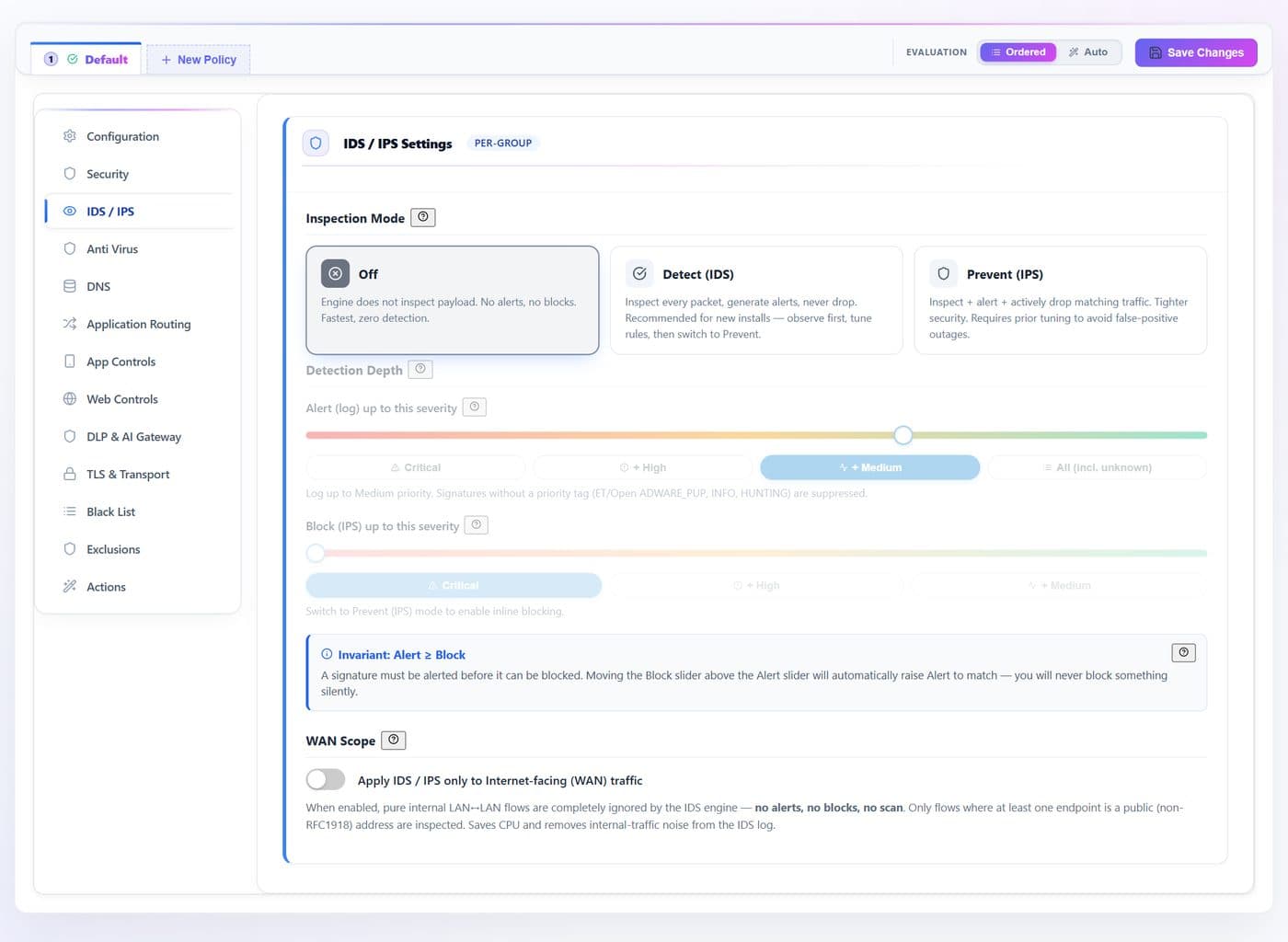
- 1
- 2
- 3
- 4
| # | Control | What it does · how · why |
|---|---|---|
| 1 | Inspection Moderadio | Off — no payload inspection. Detect (IDS) — inspect and alert, never drop; the right setting for a new install: observe, tune, then switch. Prevent (IPS) — inspect, alert and drop matches. ids.mode · ids.enable |
| 2 | Alert up to this severityslider | How deep to log: Critical → +High → +Medium → All. Signatures with no priority tag (ADWARE_PUP, INFO, HUNTING) are suppressed below “All”. ids.alert_max_priority |
| 3 | Block up to this severityslider | How deep to drop, capped at the Alert level. Start at Critical only and widen as you tune out false positives. ids.block_max_priority |
| 4 | WAN-only scopetoggle | Ignores purely internal LAN↔LAN flows — no alerts, no blocks — and inspects only flows touching a public address. Saves CPU and removes internal noise from the IDS log. ids.wan_only |
Anti Virus
File scanning of transferred content (ClamAV). A group-level policy, plus optional per-protocol overrides for web, mail, file-share and IoT protocols.
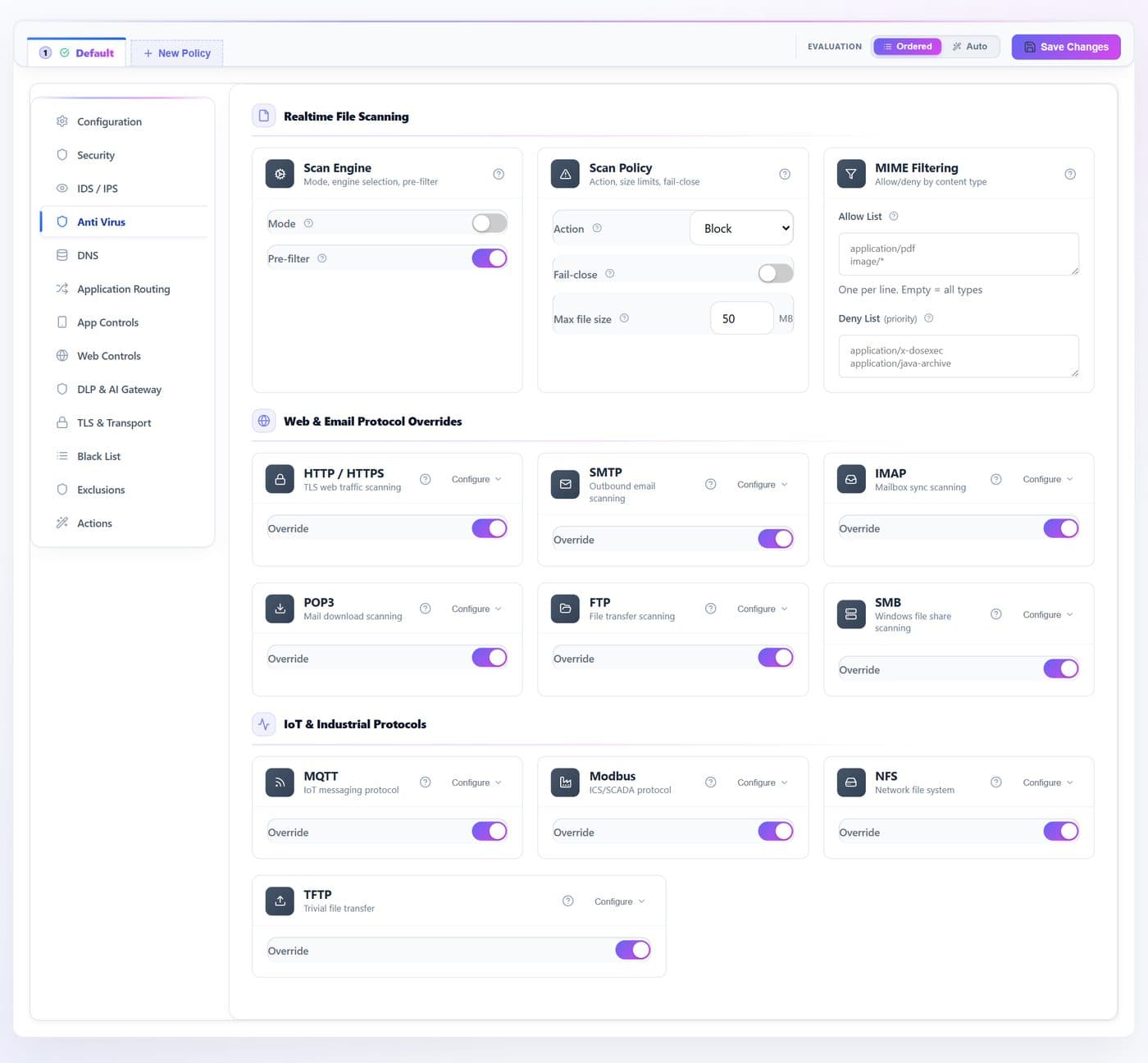
- 1
- 2
- 3
- 4
- 5
- 6
- 7
- 8
| # | Control | What it does · how · why |
|---|---|---|
| 1 | Modetoggle | Master on/off for file scanning in this group. The first enable installs and starts the virus engine. file.scan.mode |
| 2 | Actionselect | What to do on a detection: log, block, or quarantine the device. file.scan.action |
| 3 | Pre-filtertoggle | A fast pre-screen before full scanning. On by default. file.scan.prefilter |
| 4 | Fail-closetoggle | If a scan cannot complete, block the transfer instead of letting it through. Off means fail-open. file.scan.fail_close |
| 5 | Max file size (MB)num | Files larger than this skip scanning entirely. Empty means unlimited. file.scan.max_mb |
| 6 | Allow Listtext | Restrict scanning to these MIME types, one per line. file.scan.mime_allow |
| 7 | Deny Listtext | Never scan these MIME types; takes priority over the allow list. file.scan.mime_deny |
| 8 | Protocol Overridetoggle | Turns on a per-protocol policy for that card — HTTP/S, SMTP, IMAP, POP3, FTP, SMB, MQTT, Modbus, NFS, TFTP. Each exposes the same mode, action, engine, pre-filter, size and MIME set as the group. file.scan.protocols.<proto> |
DNS
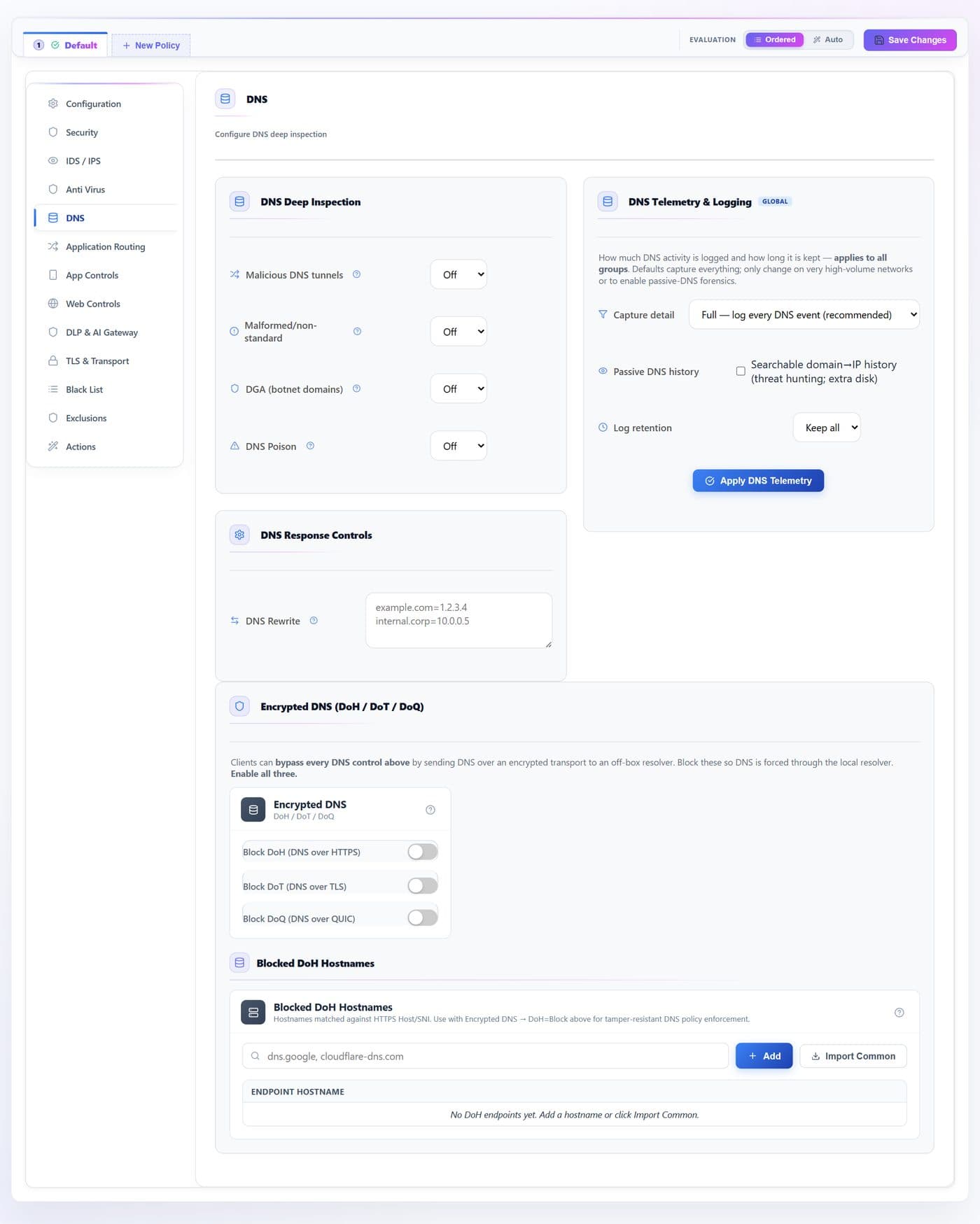
DNS-layer heuristics evaluated for this group, plus global capture settings and encrypted-DNS controls.
- 1
- 2
- 3
- 4
- 5
- 6
- 7
- 8
- 9
- 10
- 11
| # | Control | What it does · how · why |
|---|---|---|
| 1 | Malicious DNS tunnelsselect | Detects data exfiltration tunnelled over DNS, by query shape and reputation. dns.tunnel |
| 2 | Malformed / non-standardselect | Flags malformed or non-standard DNS messages. dns.malformed |
| 3 | DGA (botnet domains)select | Detects algorithmically generated domains typical of botnet rendezvous. dns.dga |
| 4 | DNS Poisonselect | Stateful cache-poisoning detection — duplicate transaction ids, impossible timing, abnormal TTLs. Evaluated for the covering group. dns.poison |
| 5 | DNS Rewritetext | Force a domain to an address, one domain=1.2.3.4 per line. IPv4 answers only. dns.rewrite |
| 6 | Capture detailselect | How much DNS telemetry to store, appliance-wide. Applied by Apply DNS Telemetry, not by Save Changes. globals.dns.telemetry |
| 7 | Apply DNS Telemetrybutton | Writes the three global capture settings immediately. globals.dns.telemetry · writerd |
| 8 | Block DoHtoggle | Blocks DNS-over-HTTPS so queries stay visible to the policies above. transport.doh_strategy |
| 9 | Block DoTtoggle | Blocks DNS-over-TLS. transport.dot_strategy |
| 10 | Block DoQtoggle | Blocks DNS-over-QUIC. transport.doq_strategy |
| 11 | Blocked DoH endpointstext | Suffix-block known DoH provider hostnames; Import Common fills in ten well-known resolvers. web.doh_endpoints_block |
Application Routing
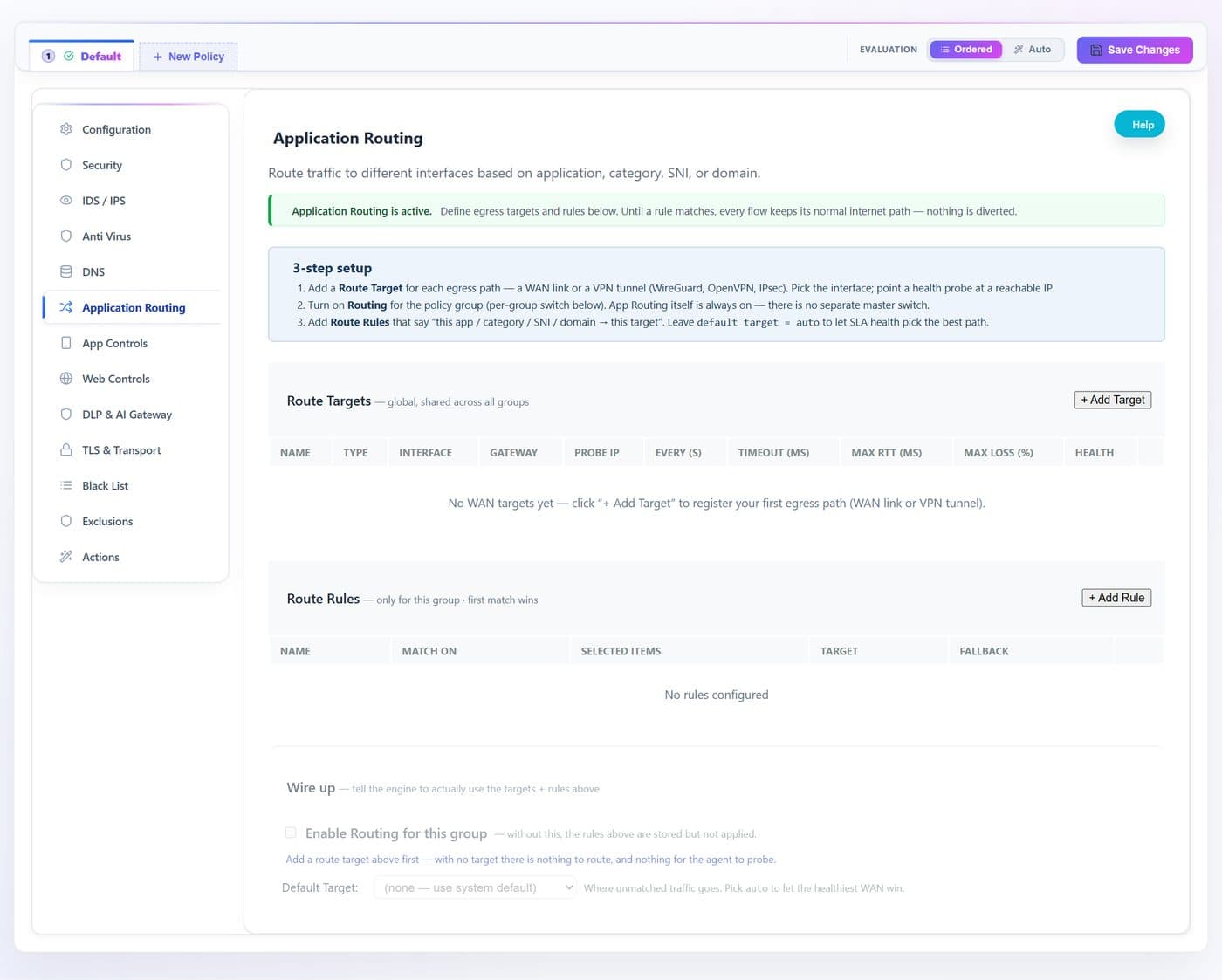
SD-WAN. Define egress targets (WAN links, VPN tunnels) with SLA probes, then steer applications, categories, SNIs or domains to a target with a fallback.
- 1
- 2
- 3
- 4
- 5
- 6
- 7
| # | Control | What it does · how · why |
|---|---|---|
| 1 | Status bannergroup | Tells you whether App Routing is active. Until a rule matches, every flow keeps its normal internet path — nothing is diverted, so turning the feature on is not itself disruptive. |
| 2 | Three-step setupgroup | The order that works: add a Route Target for each egress path, turn Routing on for the group, then add Route Rules. Skipping the middle step is the usual reason rules appear to do nothing. |
| 3 | Add Targetbutton | Registers an egress path — a WAN link or a VPN tunnel (WireGuard, OpenVPN, GRE) — and opens a row with its fields: name (what rules refer to; keep it short, the engine truncates long ones), type and interface, gateway, and the SLA probe (target address, interval, timeout, and the latency, loss and jitter thresholds that decide whether the path counts as healthy). Targets are global — every group picks from the same list. globals.routing.targets |
| 4 | Route Targets tablegroup | One row per egress path with its live health. Empty, as here, means no path is registered yet and no rule can divert anything. globals.routing.targets |
| 5 | Add Rulebutton | Steer traffic: match on app, category, SNI or domain, send it to a target, optionally with a fallback. Rules the validator rejects are badged and dropped by the engine at load. routing.routes[] |
| 6 | Enable Routing for this grouptoggle | The master switch. Without it the rules above are inert and the appliance forwards normally. Turning it on for any group also enables the global SD-WAN gate. routing.enabled |
| 7 | Default Targetselect | Where traffic that matches no rule egresses; auto follows the healthiest WAN. routing.default_target |
App Controls
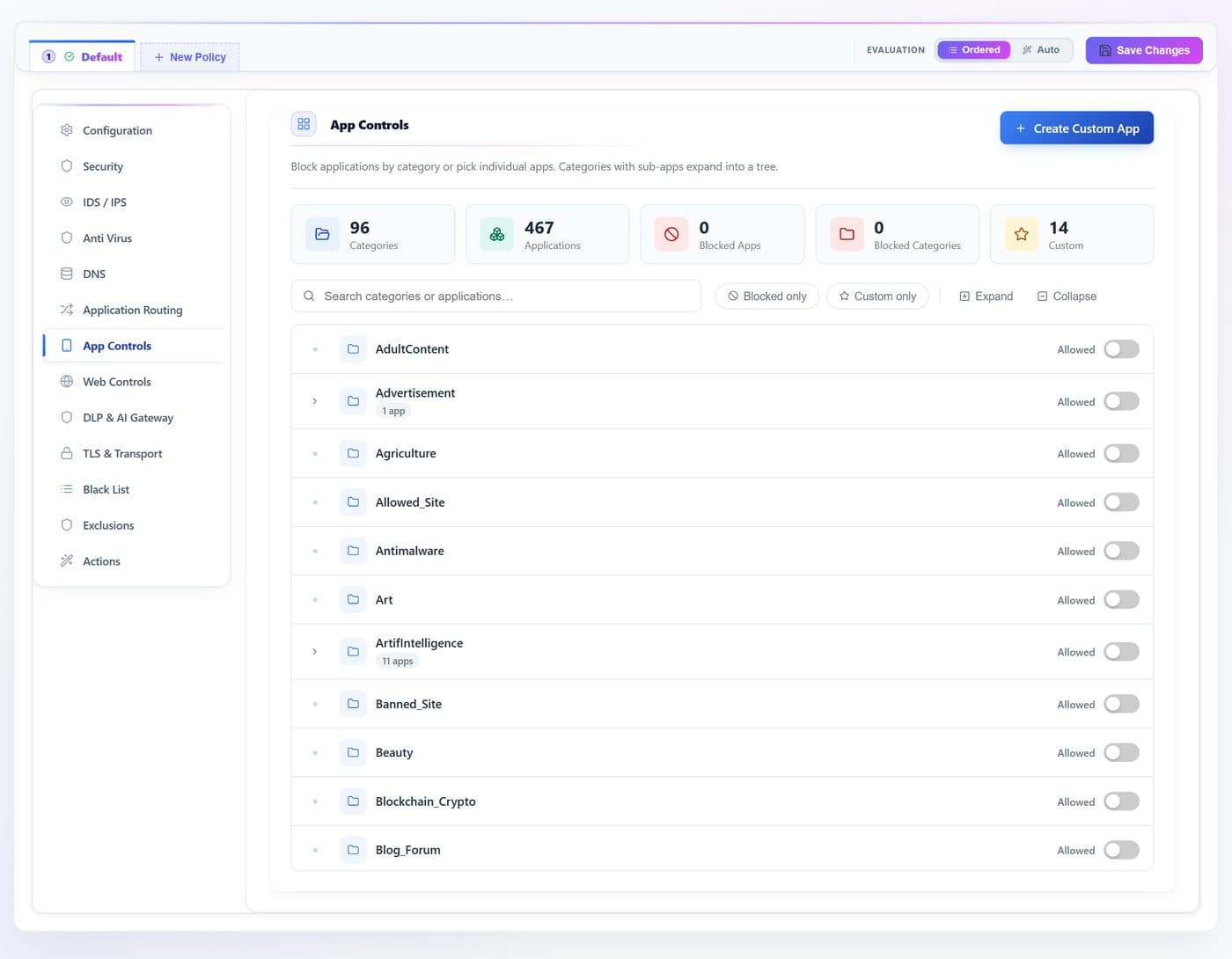
Block traffic by application or by whole application category, using the engine’s deep-packet classifier — around 90 categories and several hundred applications, searchable, plus a custom-application builder.
- 1
- 2
- 3
- 4
- 5
- 6
| # | Control | What it does · how · why |
|---|---|---|
| 1 | Create Custom Appbutton | Define an application by domains, ports or destination CIDRs so your own or niche services can be matched by name. Needs at least one criterion; names are truncated to 63 characters. globals.apps.custom[] |
| 2 | Searchtext | Filter the tree by category, application name or key. view filter |
| 3 | Blocked onlybutton | Show just what is currently blocked — the fastest way to review a group’s footprint. view filter |
| 4 | Custom onlybutton | Show just the applications you defined. view filter |
| 5 | Expand / Collapsebutton | Open or close every category that contains applications. view state |
| 6 | Category switchtoggle | Blocks the whole category. The counter beside a category name shows how many applications it holds. apps.categories_block |
Web Controls
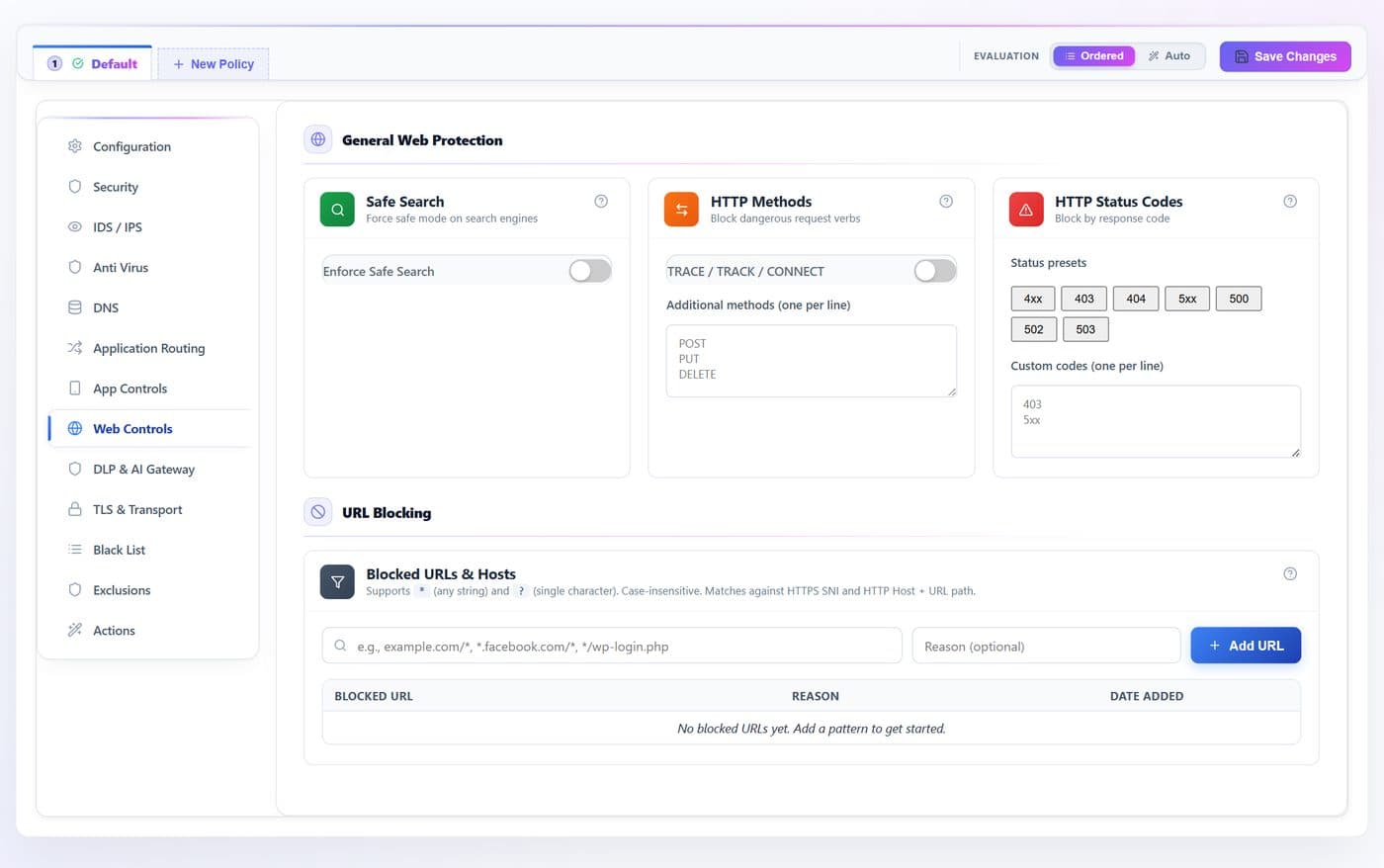
HTTP-layer controls: safe-search enforcement, method and status-code blocking, and the URL blocklist.
- 1
- 2
- 3
- 4
- 5
- 6
- 7
| # | Control | What it does · how · why |
|---|---|---|
| 1 | Enforce Safe Searchtoggle | Forces Google, Bing, YouTube and DuckDuckGo into strict SafeSearch by rewriting the request on the wire — no client configuration needed. web.safe_search.enable |
| 2 | TRACE / TRACK / CONNECTtoggle | One switch for the three methods most often used to probe a proxy. web.http_method_block |
| 3 | Additional methodstext | Block further HTTP methods, one per line; stored upper-case. web.http_method_block |
| 4 | Status presetsbutton | Block whole response classes or single codes with one click. web.http_status_block |
| 5 | Custom status codestext | Block further status codes, one per line. web.http_status_block |
| 6 | Blocked URLtext | Block hosts and path patterns — *.facebook.com/*, */wp-login.php. web.url_block |
| 7 | Reasontext | An optional note kept with the entry, so the next operator knows why it is there. web.url_block_notes |
DLP · Regex mode
Data-loss prevention over request bodies. In Regex only mode the engine matches a library of validated detectors plus your own patterns — no external service is involved.
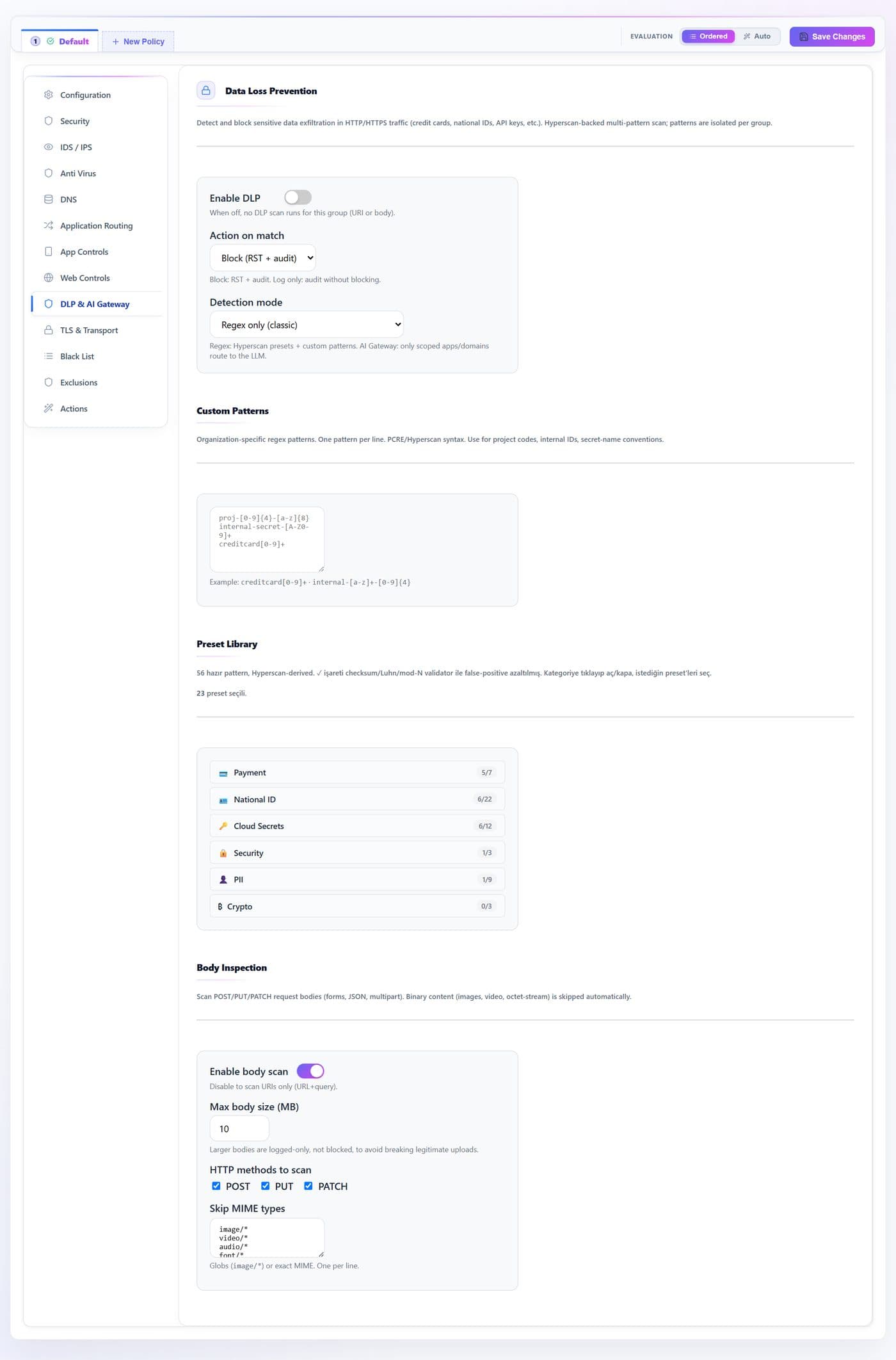
- 1
- 2
- 3
- 4
- 5
- 6
- 7
- 8
| # | Control | What it does · how · why |
|---|---|---|
| 1 | Enable DLPtoggle | Master switch for this group. Off means no DLP scanning at all, URI or body. web.dlp.enable |
| 2 | Action on matchselect | Block (reset the connection and audit) or log only. web.dlp.action |
| 3 | Detection modeselect | Regex only runs the preset library and your patterns. AI Gateway additionally routes scoped applications and domains to a language model. web.dlp.mode |
| 4 | Custom Patternstext | Your own expressions, one per line — project codes, internal identifiers, secret-name conventions. web.dlp.patterns |
| 5 | Preset Librarygroup | Around 50 ready detectors grouped by family: payment cards, national identifiers, cloud secrets, keys, personal data, crypto. A ✓ marks the ones with a checksum validator (Luhn, mod-97, mod-11), which keeps false positives low. Click a family to open it and pick individual presets. web.dlp.presets |
| 6 | Enable body scantoggle | Scan request bodies, not just the URI. Off means URI and query string only. web.dlp.body_inspection.enable |
| 7 | Max body size (MB)num | Bodies larger than this are not scanned. web.dlp.body_inspection.max_mb |
| 8 | Skip MIME typestext | Content types never worth scanning — images, video, octet-stream — skipped before any pattern runs. web.dlp.body_inspection.skip_mime |
DLP · AI Gateway mode
Switching Detection mode to AI Gateway replaces the pattern-only form with a language-model classifier and a per-provider rule list — for inspecting what staff paste into ChatGPT-style services.
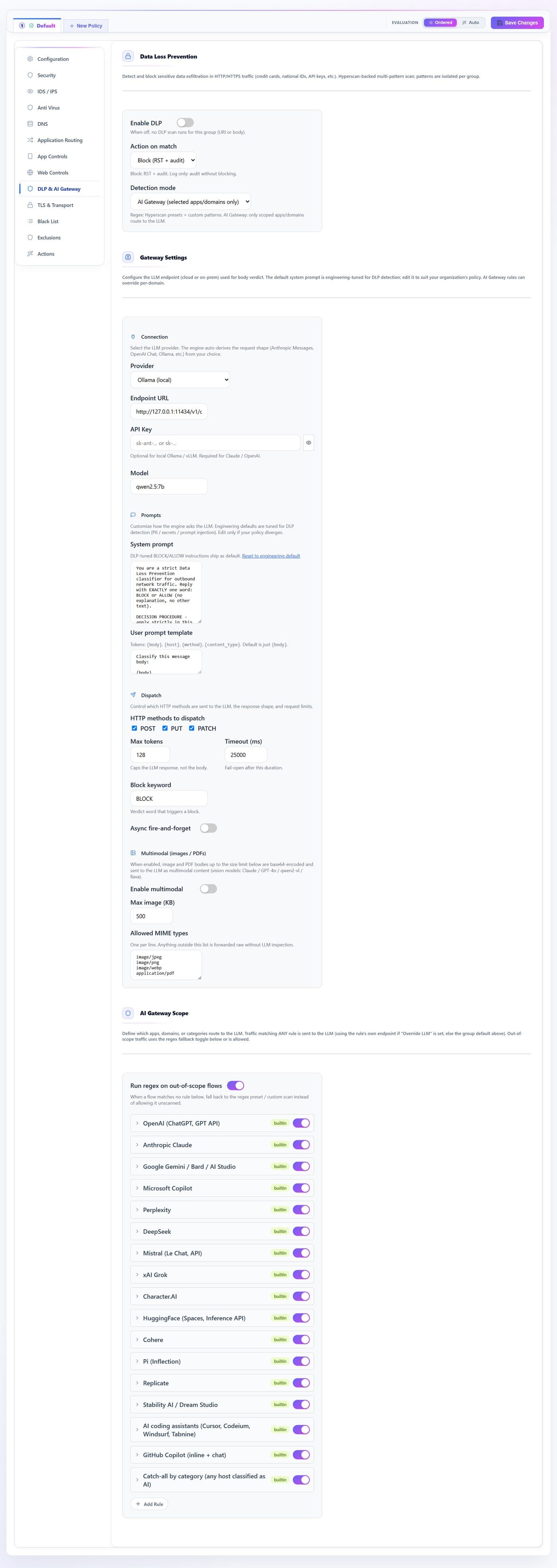
- 1
- 2
- 3
- 4
- 5
- 6
- 7
- 8
- 9
- 10
- 11
- 12
| # | Control | What it does · how · why |
|---|---|---|
| 1 | Detection modeselect | Set to AI Gateway. The regex-only controls are replaced by the provider settings below. web.dlp.mode |
| 2 | Providerselect | Which classifier to call — a local runtime keeps bodies on the appliance; a hosted API sends them out. web.dlp.llm.provider |
| 3 | Endpoint URLtext | Where to reach the model. The default points at a local runtime on the appliance itself. web.dlp.llm.endpoint |
| 4 | API Keytext | Credential for a hosted provider; stored in the policy document, so prefer a local runtime when the data is sensitive. web.dlp.llm.api_key |
| 5 | Modeltext | Model identifier to request. web.dlp.llm.model |
| 6 | System prompttext | The classifier’s instructions. The shipped prompt is hardened to answer with a single verdict keyword. web.dlp.llm.system_prompt |
| 7 | Block keywordtext | The exact word the model must return for the submission to be blocked. web.dlp.llm.block_keyword |
| 8 | Timeout (ms)num | How long to wait for a verdict before giving up on the flow. web.dlp.llm.timeout_ms |
| 9 | Max tokensnum | Caps the classifier’s reply length — a verdict needs very few. web.dlp.llm.max_tokens |
| 10 | Async fire-and-forgettoggle | Send the body for classification but do not hold the request. Audits without adding latency; it cannot block. web.dlp.llm.async |
| 11 | Regex on out-of-scope flowstoggle | Still run the pattern library on traffic that no gateway rule scopes, so switching modes does not silently stop covering everything else. web.dlp.regex.fallback_when_out_of_scope |
| 12 | AI Gateway rulesbutton | One rule per provider: the applications, domains and request paths that count as a submission, with an optional per-rule model override. The shipped list already covers the major assistants. web.dlp.ai_gateway.rules[] |
TLS & Transport
TLS interception and transport controls. Bumping decrypts HTTPS so every deep-inspection feature can see inside it; the bypass and pinning lists carve out the traffic that must stay untouched.
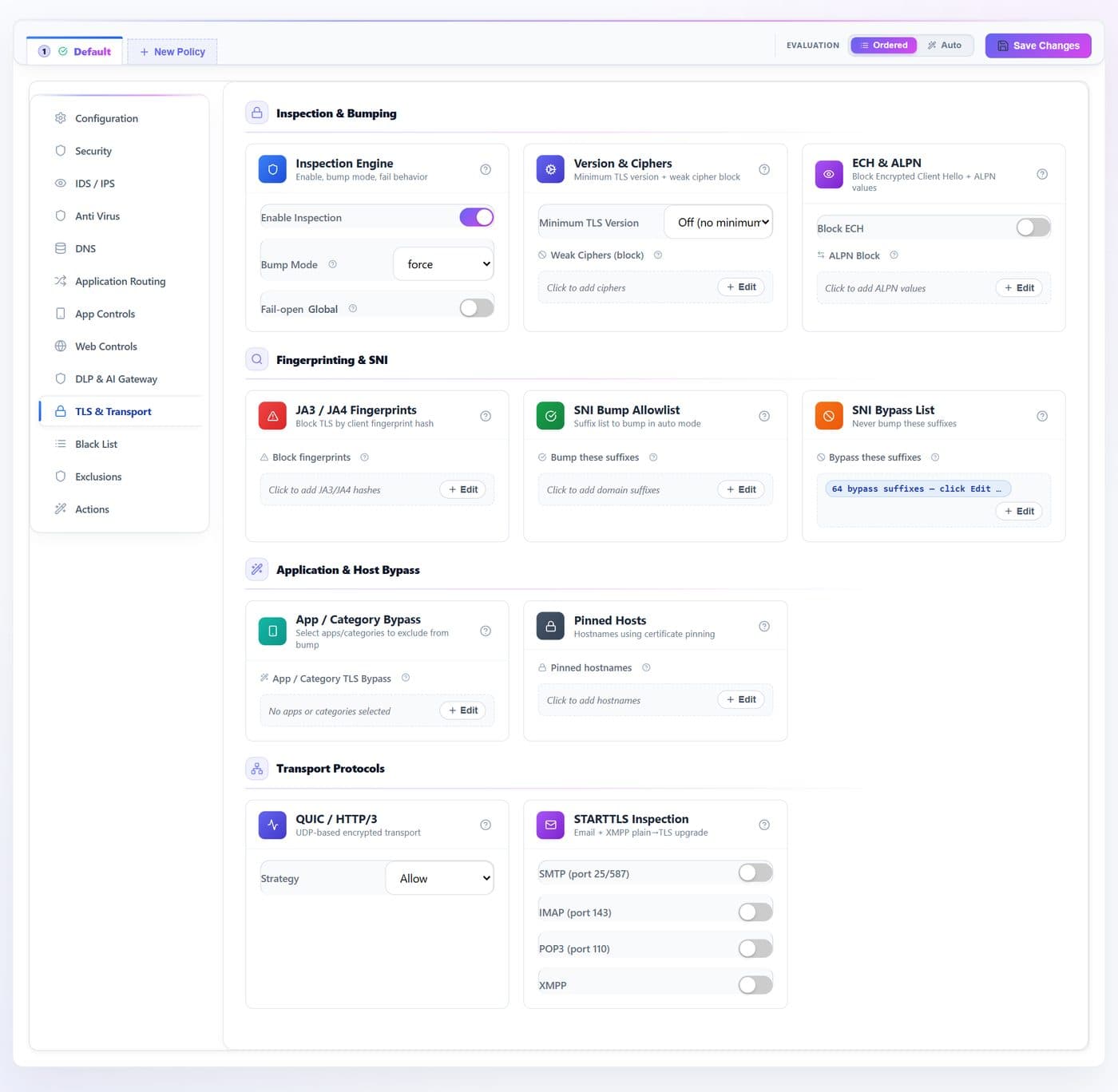
- 1
- 2
- 3
- 4
- 5
- 6
- 7
- 8
| # | Control | What it does · how · why |
|---|---|---|
| 1 | Enable Inspectiontoggle | Turns TLS bumping on for this group. tls.enable_inspection |
| 2 | Bump Modeselect | How aggressively to intercept: inherit the global, auto, force, or off. tls.bump_mode |
| 3 | Minimum TLS Versionselect | Refuse handshakes below this version. Applies to new connections. tls.min_version |
| 4 | Block ECHtoggle | Blocks Encrypted ClientHello, which otherwise hides the server name. Test before enabling broadly — modern browsers use it. tls.ech_block |
| 5 | Fail-opentoggle | On a bump failure, let the flow through rather than dropping it. tls.fail_open |
| 6 | List editorsbutton | Each Edit opens a validated list: weak ciphers, ALPN, JA3/JA4 fingerprints, SNI suffixes to bump or bypass, application and category bypass, and pinned hostnames. tls.weak_ciphers_block · alpn_block · ja3_block · ja4_block_sha256 · sni_bump_sfx · sni_bypass_sfx · tls_app_bypass · tls_cat_bypass · pinned_hosts |
| 7 | QUIC / HTTP-3 Strategyselect | Allow QUIC, or block it so clients fall back to inspectable TCP. transport.quic_strategy |
| 8 | STARTTLStoggle | Intercept opportunistic TLS upgrades on SMTP, IMAP, POP3 and XMPP. transport.starttls |
Black List · Group
Direct block lists for this group. The Global sub-tab holds entries that apply to every group.
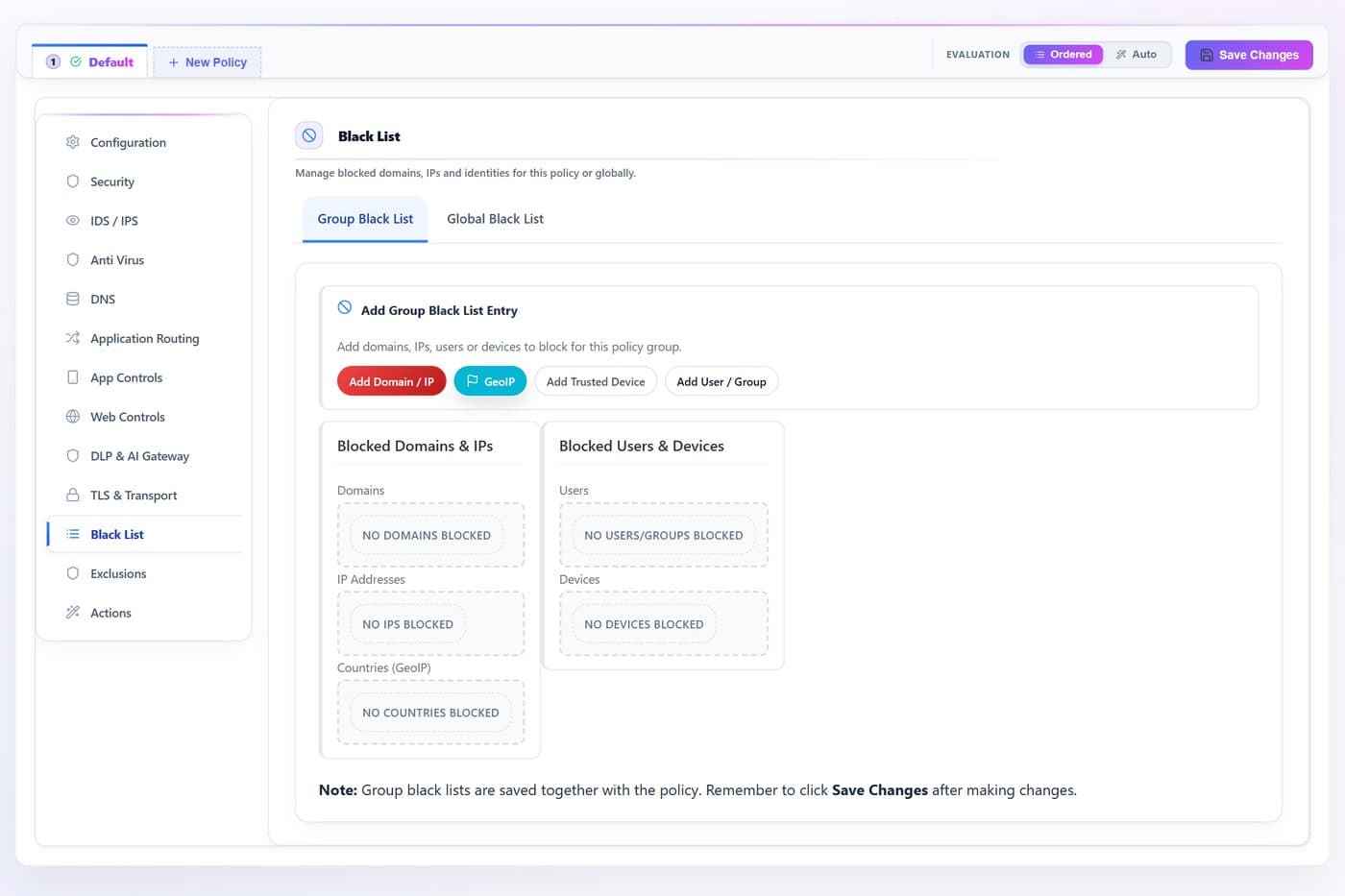
- 1
- 2
- 3
- 4
| # | Control | What it does · how · why |
|---|---|---|
| 1 | Add Domain / IPbutton | Block a domain (matched on DNS query, SNI and Host) or an address/subnet. dns.block_domains · network.dst_ip_block |
| 2 | GeoIPbutton | Block whole countries by ISO code, from a searchable picker. geo.country_block |
| 3 | Add Trusted Devicebutton | Block a specific device by identity. identity.device_block |
| 4 | Add User / Groupbutton | Block a directory user or group. identity.user_block · group_block |
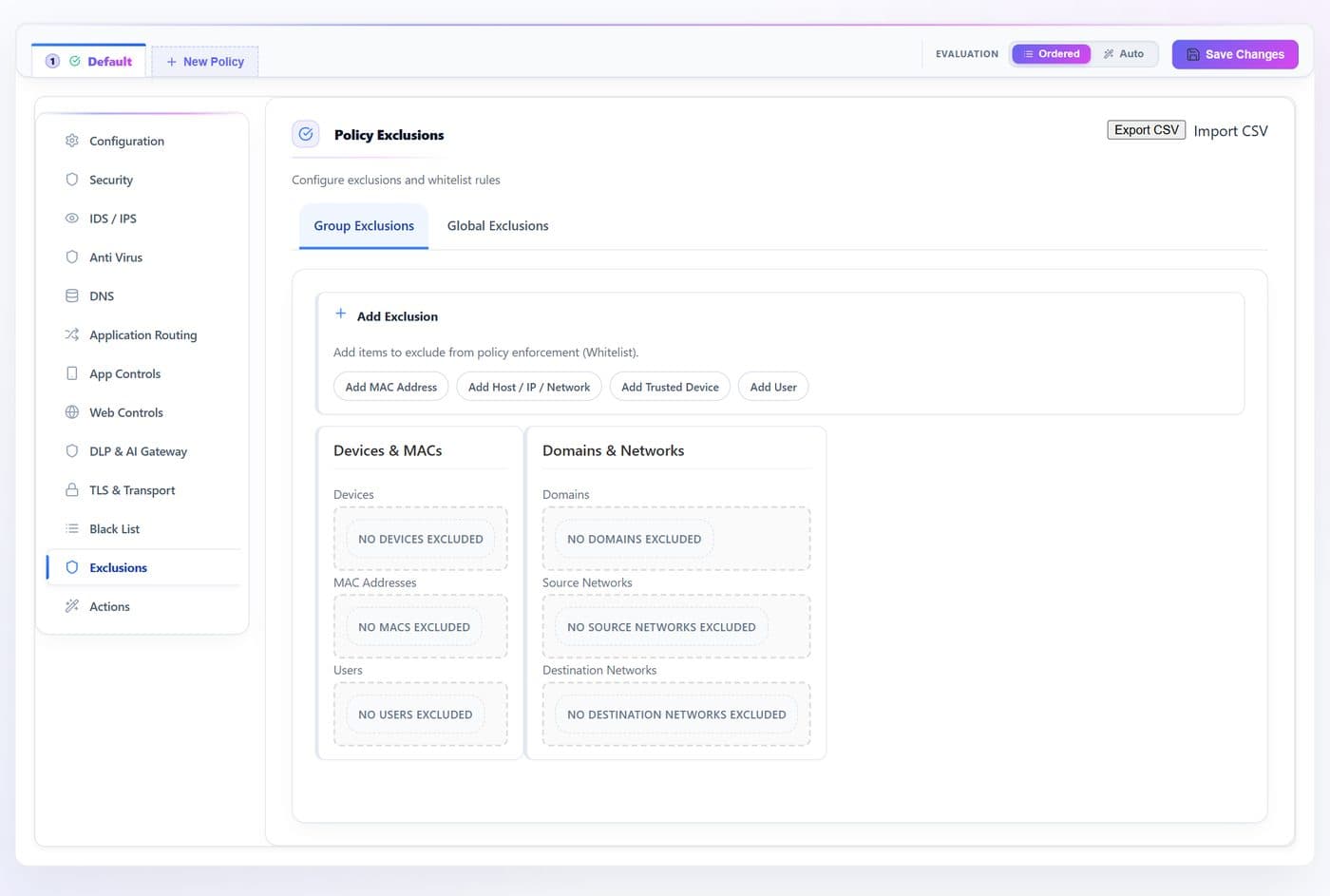
Exclusions · Group
Allow-list carve-outs that bypass this group’s enforcement — the escape hatch for a business-critical host or a false positive you cannot wait to tune out.
- 1
- 2
- 3
- 4
- 5
| # | Control | What it does · how · why |
|---|---|---|
| 1 | Export / Import CSVbutton | Round-trip the exclusion set as type,value rows for review or bulk edit. exclusions.* |
| 2 | Add MAC Addressbutton | Exclude a device by hardware address. exclusions.macs |
| 3 | Add Host / IP / Networkbutton | Exclude a domain (mirrored to the DNS allow-list) or a source/destination subnet. exclusions.domains · src_cidrs · dst_cidrs |
| 4 | Add Trusted Devicebutton | Exclude a named device from the inventory. exclusions.devices |
| 5 | Add Userbutton | Exclude a directory user wherever they connect from. exclusions.users |
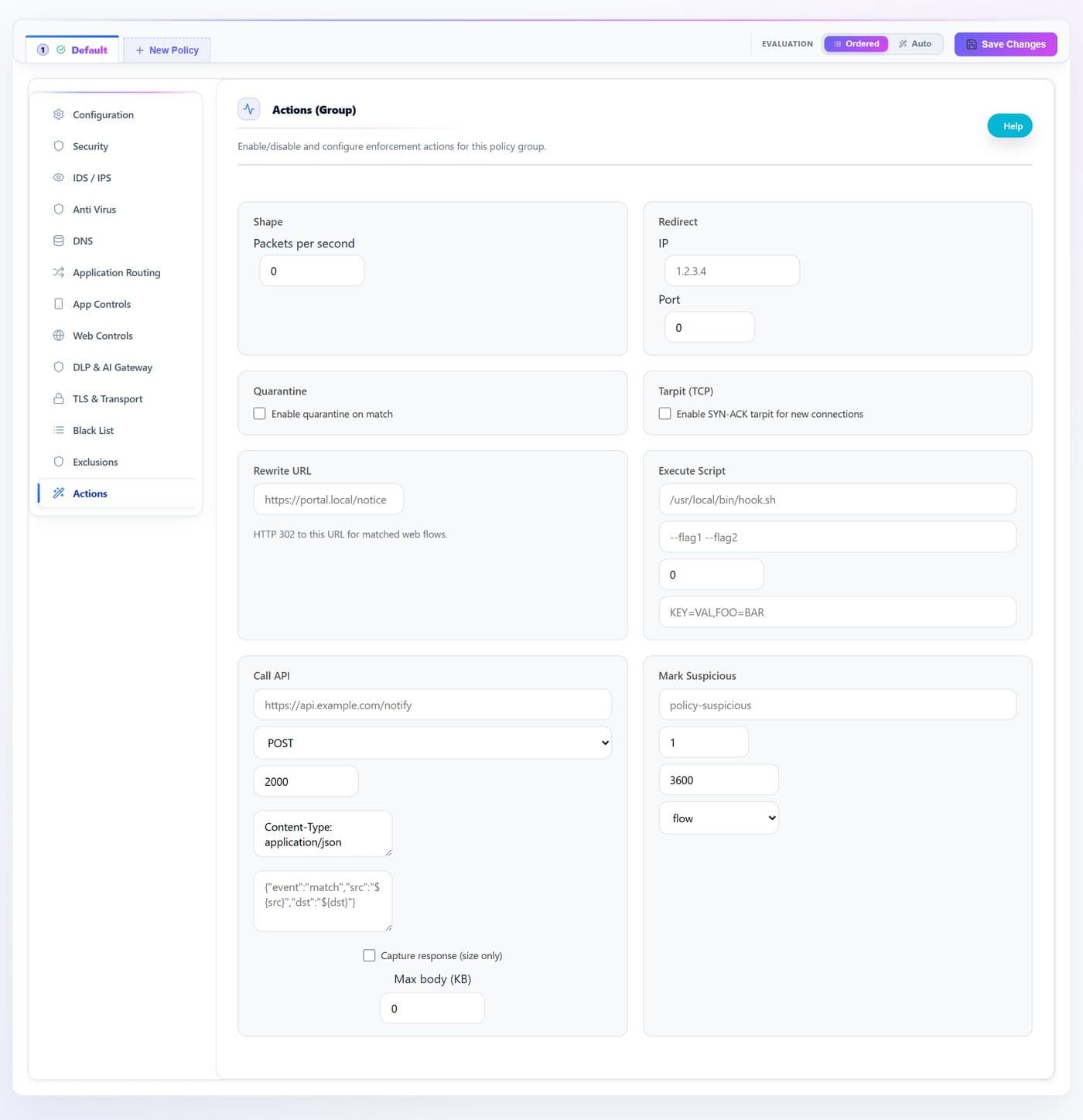
Actions
Side effects the group attaches to a drop decision — shape, redirect, quarantine, tarpit, rewrite, run a script, call an API, or tag the device.
- 1
- 2
- 3
- 4
- 5
- 6
- 7
- 8
- 9
| # | Control | What it does · how · why |
|---|---|---|
| 1 | Shape — packets/secnum | Rate-limit matched flows instead of dropping them outright. 0 is off. actions.shape.pps |
| 2 | Redirect — IPtext | Send matched traffic to another endpoint, for example a notice page. actions.redirect.ip |
| 3 | Redirect — Portnum | The port on that endpoint. actions.redirect.port |
| 4 | Quarantine on matchtoggle | Move the offending device into quarantine so later flows are handled as untrusted. actions.quarantine.enable |
| 5 | SYN-ACK tarpittoggle | Slow new connections to a crawl rather than refusing them cleanly — useful against scanners. actions.tarpit.enable |
| 6 | Rewrite URLtext | Rewrite the request target on plain HTTP, typically to an explanation page. actions.rewrite_url.to |
| 7 | Execute Scripttext | Run a script on a drop, with arguments, timeout and environment. $src, $dst and $rule_id are substituted. actions.execute_script |
| 8 | Call APItext | Notify an external system on a drop — method, headers and body are configurable, and the response size can be recorded. actions.call_api |
| 9 | Mark Suspicioustext | Tag the flow or the device with a name, severity and lifetime, so the risk tag and label block lists can act on it — including on the very next flow. actions.mark_suspicious |