Tunnels the console provisions
Keys, addressing and routes are generated and pushed from one topology view. Adding a site is placing a node, not hand-editing configuration on two firewalls.
SASE & secure connectivity
A hub-and-spoke overlay built on WireGuard, orchestrated from the console. Spokes dial out, hubs inspect, and policy follows the user rather than the address they happen to have.
Place the sites and connect them. The console writes the configuration for both ends of every tunnel and pushes it — nobody opens a firewall and types a rule. Minutes, not an afternoon.
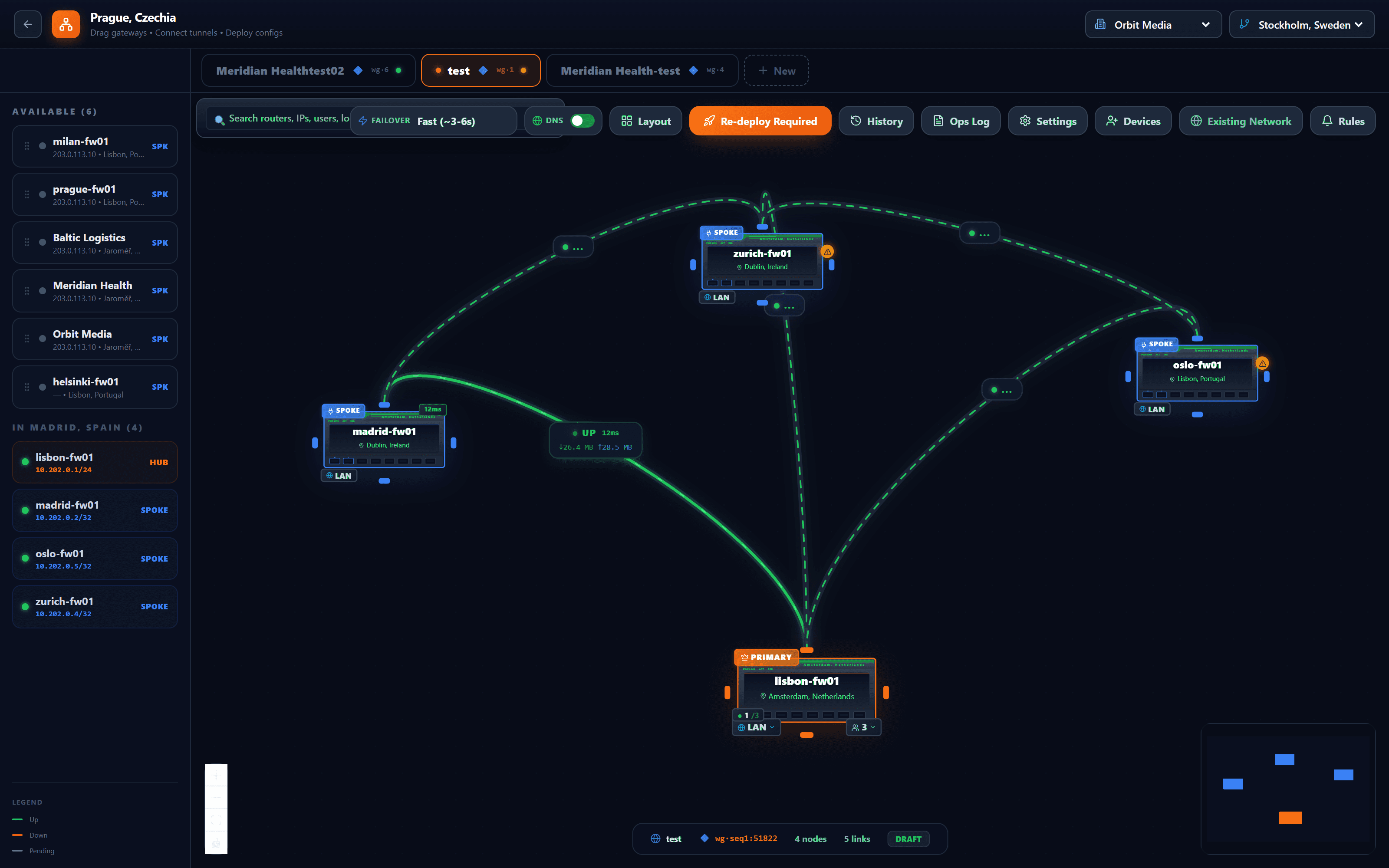
The firewalls a customer already has, listed by site. Drag one onto the canvas and it becomes a spoke or the hub.
Everything arriving at the primary hub meets the same policy: application control, IDS/IPS, TLS inspection, DLP and the AI gateway.
Up or down, latency, bytes in each direction — on the link, where you are looking, not in a log you would have to open.
How quickly spokes move to a backup hub when the primary stops answering is a setting of the drawing, not of each firewall.
The canvas knows when it differs from what the firewalls run. One button writes the configuration for both ends of every tunnel and pushes it.
Tunnel transport
Chosen once for the topology.
People, not just sites
Remote users are added the same way, with a one-time enrolment link. Access is per device, so a lost laptop is revoked on its own.
Zedmos publishes the releases. You decide which firewalls take them and when.
Zedmos
For the console and for the firewall, on their own schedules. The console tells you one is available rather than waiting for you to look.
You
A few firewalls first, then the rest — or the whole estate at once. Upgrading a small group before the others is what finds a problem while it is still small.
You
The version of every firewall, in one list. A device that fell behind fell behind for a reason, and it is missing every fix since.
Four steps, and only the first two need anyone. Keys are generated on each device and never travel; the console distributes the public half and nothing else.
You
One site becomes the hub — usually the one with a fixed address and the room to inspect. Every other site is a spoke; nothing needs a fixed address but the hub.
You
Adding a site to the topology writes the configuration for both ends of the tunnel at once — the spoke and the matching change on the hub — so the two cannot drift apart.
Zedmos
Each spoke establishes the tunnel outbound to the hub. That is why a branch on a consumer line with a changing address works without anyone opening a port for it.
Zedmos
A remote user opens a one-time link; their device makes its own key and receives the routes it is entitled to. Losing a laptop revokes that device and leaves their others working.
Keys, addressing and routes are generated and pushed from one topology view. Adding a site is placing a node, not hand-editing configuration on two firewalls.
Deploy a backup hub and the console can move the spokes to it when the primary stops answering. Switching is opt-in and takes a few minutes, because it waits out a silence threshold and then confirms with a health check rather than reacting to one missed packet. You can also trigger it yourself, with a preview of what will change.
A one-time enrolment link generates the keypair on the user's own device — the private key is never seen by the console — and split or full tunnel is a policy choice.
Demo & pricing: info@zedmos.com
Request a demo